
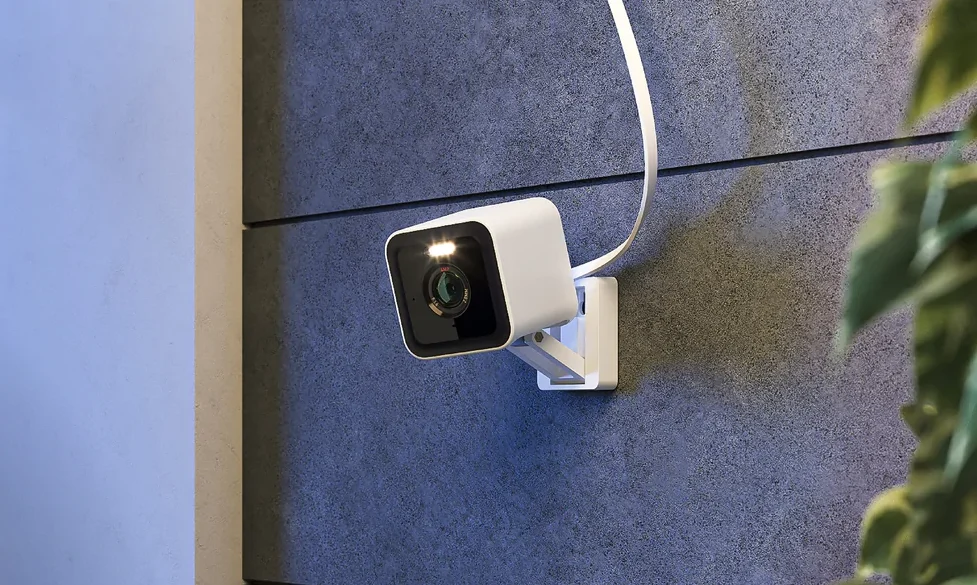
Keeping your home safe is an important part of protecting your family, belongings, and personal space. Modern security cameras make it easier to monitor different areas of a property without installing an expensive traditional surveillance system. Whether you want to check your front entrance, watch your pets, monitor a living room, or keep an eye on your backyard, a smart security camera can provide an extra level of convenience.
The WYZE Cam Pan v3 is a compact security camera designed for both indoor and outdoor use. It combines 1080p Full HD video, remote pan and tilt controls, motion tracking, color night vision, and two-way audio in one device. Its weather-resistant construction also makes it suitable for certain outdoor locations when installed correctly.
Unlike a basic fixed camera, this model can rotate horizontally and vertically, allowing users to monitor a wider area through the Wyze app. However, its performance depends on internet connectivity, camera placement, lighting conditions, and the features available with the selected storage or subscription option.
In this review, we will explore the main features of the WYZE Cam Pan v3, its benefits, installation process, advantages, limitations, and the types of homeowners who may find it useful.
What Is the WYZE Cam Pan v3?
The WYZE Cam Pan v3 is a smart security camera that allows users to view monitored areas through a compatible smartphone. It is designed to provide a flexible monitoring solution for indoor spaces and suitable outdoor locations.
The camera records video at 1080p Full HD resolution and supports remote movement across a broad viewing area. Its horizontal rotation reaches 360 degrees, while its vertical tilt range extends to 180 degrees. These movements help users check different parts of a room or outdoor area without manually repositioning the device.
The camera also includes motion tracking, color night vision, motion and sound notifications, and two-way audio. A dedicated privacy mode allows the camera to point downward and stop viewing the surrounding area when privacy is needed.
Its IP65 weather-resistance rating makes it suitable for certain outdoor installations, but the camera still requires appropriate placement and protection. For safe outdoor operation, a compatible outdoor power adapter may be required separately.
Overall, the WYZE Cam Pan v3 is designed for homeowners who want flexible monitoring without purchasing a large or complicated security system.
Key Features of the WYZE Cam Pan v3
The camera offers several features that can make everyday home monitoring more convenient.
1080p Full HD Video Quality
The WYZE Cam Pan v3 records video at 1080p Full HD resolution. This provides a useful level of detail for general home monitoring, including checking entrances, observing pets, and reviewing movement around a room.
Video clarity depends on several factors, including lighting, camera positioning, internet performance, and the condition of the lens. While 1080p can provide a clear view for everyday security needs, it does not offer the same level of detail as higher-resolution cameras.
The camera also supports digital zoom. However, digital zoom enlarges the existing image rather than creating additional detail, so heavily zoomed footage may appear less clear.
For homeowners who want an affordable way to monitor everyday activity, Full HD video can be a practical starting point.
360-Degree Pan and 180-Degree Tilt
One of the most useful features of the WYZE Cam Pan v3 is its ability to rotate and tilt.
The camera can pan horizontally through 360 degrees and tilt vertically through 180 degrees. This movement helps users view different sections of a room or outdoor area using the smartphone app.
For example, a camera placed in a living room can be turned toward a doorway, sofa, window, or another part of the space. Outside, it may help monitor a driveway, patio, or garden area when installed in a suitable location.
This flexibility can reduce the need for several fixed cameras in some situations. However, the camera cannot display every direction at the same time, and physical obstacles may block its view.
Automatic Motion Tracking
Motion tracking allows the camera to follow detected movement automatically. When a person or pet moves through the monitored area, the camera can rotate to keep the activity within its view.
This feature may be useful for monitoring pets, checking movement in common areas, or observing activity near an entrance.
The camera’s tracking performance depends on the type of movement, lighting conditions, and the environment. Fast movement, crowded scenes, and objects that resemble one another may affect how consistently the camera follows a subject.
Motion tracking is a useful convenience, but it should not be treated as a guarantee that every event will be captured perfectly.
Color Night Vision
Nighttime monitoring is important because many security concerns occur when outdoor lighting is limited or household members are asleep.
The WYZE Cam Pan v3 supports color night vision, helping it capture color details in suitable low-light conditions. This can make nighttime footage more informative than a traditional black-and-white image when enough light is available.
The camera also has infrared night vision for darker environments. Image quality will depend on the available light, distance from the subject, and surrounding conditions.
For the best results, position the camera so that important areas are visible and avoid pointing it directly toward bright lights that may affect the image.
IP65 Weather Resistance
Unlike indoor-only security cameras, the WYZE Cam Pan v3 is designed for indoor and outdoor use. Its IP65 rating indicates protection against dust and water jets under specified testing conditions.
This makes it suitable for certain outdoor locations, such as a covered entrance or an appropriately exposed exterior wall, when installed according to the manufacturer’s instructions.
However, IP65 does not mean the camera is waterproof under every condition or suitable for submersion. Proper mounting, cable protection, and power arrangements remain important.
Outdoor installations may require a compatible outdoor power adapter sold separately. Check the manufacturer’s requirements before installing the camera outside.
Two-Way Audio
The built-in microphone and speaker support two-way audio. This allows users to listen to sounds near the camera and speak through it using the compatible app.
The feature may be helpful when checking on pets, communicating with family members, or speaking to someone near an entrance.
Audio quality depends on the surrounding noise, network connection, and distance from the camera. It is best used as a convenient communication feature rather than a replacement for a dedicated intercom system.
When using audio recording or monitoring, remember that privacy laws and expectations vary by location. Avoid recording private conversations without appropriate permission.
Privacy Mode
Smart cameras can create privacy concerns when they are placed in bedrooms, living rooms, or other personal spaces. The WYZE Cam Pan v3 includes a privacy mode that points the camera downward, turns it away from the viewing area, and switches the camera off as designed.
This offers a convenient way to stop normal viewing without physically unplugging the device.
Privacy mode is useful when household members want additional control over indoor monitoring. Users should still review the app’s settings and understand how the camera, account, and any connected services handle recordings and data.
Benefits of Using the WYZE Cam Pan v3
The camera’s combination of movement, night vision, and smartphone access can support different home security needs.
Monitor Different Areas With One Camera
A fixed camera generally focuses on one direction. The WYZE Cam Pan v3 can rotate and tilt, allowing users to check different parts of a suitable space remotely.
This can be helpful in open living areas, large rooms, and outdoor spaces where a single camera can cover several viewing angles.
However, a movable camera does not replace every fixed camera. If you need continuous views of multiple entrances simultaneously, separate cameras may still be necessary.
Receive Motion and Sound Notifications
The camera can send notifications through the app when it detects supported motion or sound events.
These alerts may help homeowners notice activity while they are away or occupied elsewhere in the house. Users can review the camera’s view to understand what may have triggered an alert.
Notification usefulness depends on sensitivity settings, camera placement, background activity, and network reliability. Frequent movement from pets, passing vehicles, or changing light conditions may create unwanted alerts.
Adjusting the settings and carefully choosing the viewing area can help make notifications more useful.
Check Pets and Family Members Remotely
The camera’s movement and two-way audio can be useful for checking on pets or observing shared living areas.
For example, a pet owner may want to see whether a dog is resting, moving around, or approaching a particular area. Parents may also use a camera to observe a room when appropriate, although it should not replace direct supervision when a child needs care.
Place the camera where it provides a useful view without unnecessarily recording private areas.
Flexible Indoor and Outdoor Placement
Because the camera is designed for indoor and outdoor use, homeowners can choose a location that suits their monitoring needs.
Indoor placement may include a living room, home office, or pet area. Suitable outdoor locations may include an entrance, porch, or patio.
The camera requires power, and outdoor use involves additional installation considerations. Make sure the cable and adapter are appropriate for the environment and that the installation follows the manufacturer’s safety instructions.
How to Set Up the WYZE Cam Pan v3
Setting up the camera is generally straightforward, but careful placement can improve its performance.
Choose the Right Location
Decide which area you want to monitor before installing the camera. Consider entrances, windows, pets, and other locations where you want a clear view.
Avoid placing the camera where furniture, walls, plants, or other obstacles will block its movement. Also consider privacy when choosing a position, especially inside shared living spaces.
For outdoor use, select a suitable mounting location that follows the weather-resistance and power requirements.
Connect the Camera to Power
Use the supplied power equipment or a compatible accessory approved for the intended installation.
Indoor installations can generally use the included power adapter and cable. Outdoor installations may require a compatible outdoor power adapter.
Keep cables away from water exposure, sharp edges, and locations where people could trip over them. Never use damaged power cables or unsuitable adapters.
Connect Through the Wyze App
Install the compatible Wyze app on your smartphone and follow its setup instructions. The process generally involves signing in or creating an account, adding the camera, and following the on-screen pairing steps.
The WYZE Cam Pan v3 supports 2.4 GHz Wi-Fi rather than 5 GHz Wi-Fi. Make sure your network provides a suitable 2.4 GHz connection in the intended installation area.
A weak wireless signal may cause delayed video, connection problems, or unreliable notifications.
Adjust Camera Settings
After connecting the camera, configure motion detection, notification preferences, night vision, and privacy options according to your needs.
Test the pan and tilt controls to confirm that the camera can view the intended area without obstruction.
If you plan to use motion tracking, check how the camera responds to movement in the room or outdoor area. Adjust the position and settings if it frequently follows irrelevant activity.
Choose a Storage Method
The camera supports local recording through a compatible microSD card, including cards up to 256 GB when formatted using the supported exFAT format. Check the manufacturer’s instructions for compatible card types and setup.
Cloud recording options and additional features may depend on the available Wyze service plan. Review the current plan details before paying for a subscription.
Local and cloud storage have different advantages, so choose the option that best suits your recording needs, privacy preferences, and budget.
Pros and Cons of the WYZE Cam Pan v3
Before purchasing a smart security camera, it helps to consider both its strengths and limitations.
| Pros | Cons |
| 1080p Full HD video for everyday monitoring | Does not offer 2K or 4K resolution |
| 360-degree horizontal pan and 180-degree tilt | Cannot view every direction simultaneously |
| Automatic motion tracking | Tracking may be affected by lighting and activity |
| Color and infrared night vision | Nighttime detail depends on available light |
| IP65 weather resistance for suitable outdoor use | Outdoor power accessories may cost extra |
| Two-way audio for remote communication | Audio quality depends on the environment and connection |
| Privacy mode for additional control | Users still need to manage app and account privacy settings |
| Supports local microSD storage | Cloud features may depend on a subscription or service plan |
Overall, the camera offers a useful combination of features for general home monitoring. Its limitations are worth considering if you need higher-resolution footage, continuous views of several directions, or a completely wireless installation.
Is the WYZE Cam Pan v3 Suitable for Outdoor Security?
The camera’s weather-resistant design makes it more flexible than an indoor-only pan camera. It can be used in suitable outdoor locations where users want to monitor entrances, patios, driveways, or other parts of a property.
However, it is important to understand the practical limitations. The camera needs power, and its Wi-Fi connection must remain reliable. A location with poor wireless coverage may not provide consistent access to live video or alerts.
Its 1080p resolution may be adequate for general observation, but it may not provide enough detail for every identification task, especially at a distance or in poor lighting.
For outdoor installation, check the mounting position, power accessories, cable protection, and weather exposure carefully. If the property requires continuous coverage of several separate areas, multiple cameras may be a better option.
Is the WYZE Cam Pan v3 Worth Buying?
The WYZE Cam Pan v3 may be worth considering for homeowners who want an affordable, feature-rich camera for general indoor and outdoor monitoring.
Its main strengths are the 360-degree pan, 180-degree tilt, motion tracking, color night vision, two-way audio, and privacy mode. The ability to use compatible local microSD storage may also appeal to people who want a recording option beyond cloud services.
On the other hand, the camera uses 1080p video rather than a higher-resolution format, depends on 2.4 GHz Wi-Fi, and requires a suitable power arrangement. Buyers should also review the current subscription options if they want cloud-based recording or additional features.
It is a better fit for flexible everyday monitoring than for people who require professional-grade surveillance or uninterrupted views of multiple locations at once.
Final Verdict
The WYZE Cam Pan v3 is a practical smart security camera that combines remote movement, motion tracking, night vision, two-way audio, and weather resistance in one compact device. These features make it useful for checking pets, monitoring rooms, and keeping an eye on suitable outdoor areas.
Its biggest advantage is flexibility. Instead of being limited to one fixed direction, the camera can pan and tilt to provide a broader view of its surroundings. Privacy mode and local storage support also give users additional options for managing how they use the device.
Before buying, consider your video quality requirements, Wi-Fi coverage, power access, storage preferences, and installation location. If you need straightforward home monitoring with flexible viewing angles, the WYZE Cam Pan v3 is a model worth considering.
For the best experience, install it carefully, configure motion alerts to suit your environment, and review the available privacy and storage settings. A well-positioned camera can make home monitoring more convenient, although it should remain one part of a broader home security plan.